

KYC (Know Your Customer) is required for .in domains because they are managed under strict regulatory policies set by National Internet Exchange of India, which oversees the .IN registry.
Here’s the real reason—no fluff:
1. Identity Verification (Stop Fake Registrations)
Anyone can buy a domain, but without KYC, people could:
- Register domains with fake names
- Run scams or phishing websites
KYC ensures the domain owner is a real, traceable person or business.
2. Legal Compliance in India
India has strict IT and cybersecurity regulations under the Information Technology Act, 2000.
To comply, registrars must collect valid identity proof (like Aadhaar, PAN, etc.).
3. Prevent Fraud & Cybercrime
Many frauds happen using temporary or fake domains.
KYC helps authorities:
- Track domain owners
- Take action quickly if illegal activity happens
4. Domain Ownership Protection
KYC actually protects you:
- Prevents someone else from claiming your domain
- Makes ownership disputes easier to resolve
5. Registry Policy Enforcement
The NIXI mandates registrars to:
- Verify registrant details
- Suspend domains with invalid or missing KYC
What happens if you don’t complete KYC?
- Domain gets suspended
- Website stops working
- Emails stop sending/receiving
Simple Summary:
KYC for .in domains = Security + Legal compliance + Fraud prevention
(How to complete e-KYC for my domain step-by-step)
KYC Requirement for .IN Domain Registration
To register a .IN domain, the customer must first complete the KYC
(Know Your Customer) process. Once the KYC is successfully verified,
they will be eligible to register .IN domain names without restrictions.
*Note – For successful KYC verification, the customer’s contact details must
exactly match the information on their Aadhaar card.
Please ensure the following:
Full Name — should match the Aadhaar card without any
discrepancies
Complete Address — including PIN code, city, and state, as per the
Aadhaar
Mobile Number — must be the Aadhaar-linked mobile number
Providing accurate and matching details will help ensure a smooth and
successful verification process.
step 1: Check Your Email registered with HostingN(Important)
For your domain, HostingN sends a KYC email.
Look for:
Subject “Mandatory e-KYC Verification for Your .IN Domain – Action Required”
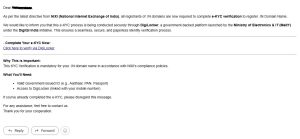
If you don’t see it:
Check Spam/Junk box in your mail id.
We have also attached a screenshot to show you the format of the email you would have received.
Step 2: Open KYC Link
– Complete Your e-KYC Now:
(Click here to verify via DigiLocker) click on link.
️ Don’t delay — link may expire in 3–7 days
Step 3: Enter Correct Details
Fill details EXACTLY matching your ID:
Full Name
Address
Email
Mobile number
Must match your domain registration info (WHOIS)
Step 4: Upload Documents
Upload clear photo/scan of:
For Individuals:
Aadhaar Card / PAN Card / Driving License
For Business:
GST Certificate / Company Registration Proof
Tips:
Use clear image (no blur)
File size usually under 2–5 MB
JPG/PDF format preferred
Step 5: Verify Mobile/Email (OTP)
Enter OTP sent to your phone/email
This confirms your identity
Step 6: Submit & Wait
Click Submit
Verification usually takes:
Instant to 24 hours
Sometimes up to 48 hours
Step 7: Confirmation
You’ll receive:
“KYC Approved” email
OR
“Rejected” (with reason)
Once the customer completes and verifies their KYC, they will be able
to register .IN domains